
SELF-SERVICE PORTALS
Microsoft Power Pages การให้คำปรึกษา
Microsoft Power Pages gives customers and suppliers secure self-service access to your business data. We design, build and integrate portals with Dynamics 365 and your existing systems.
Customer Portals • Supplier Portals • Partner Portals • Self-Service
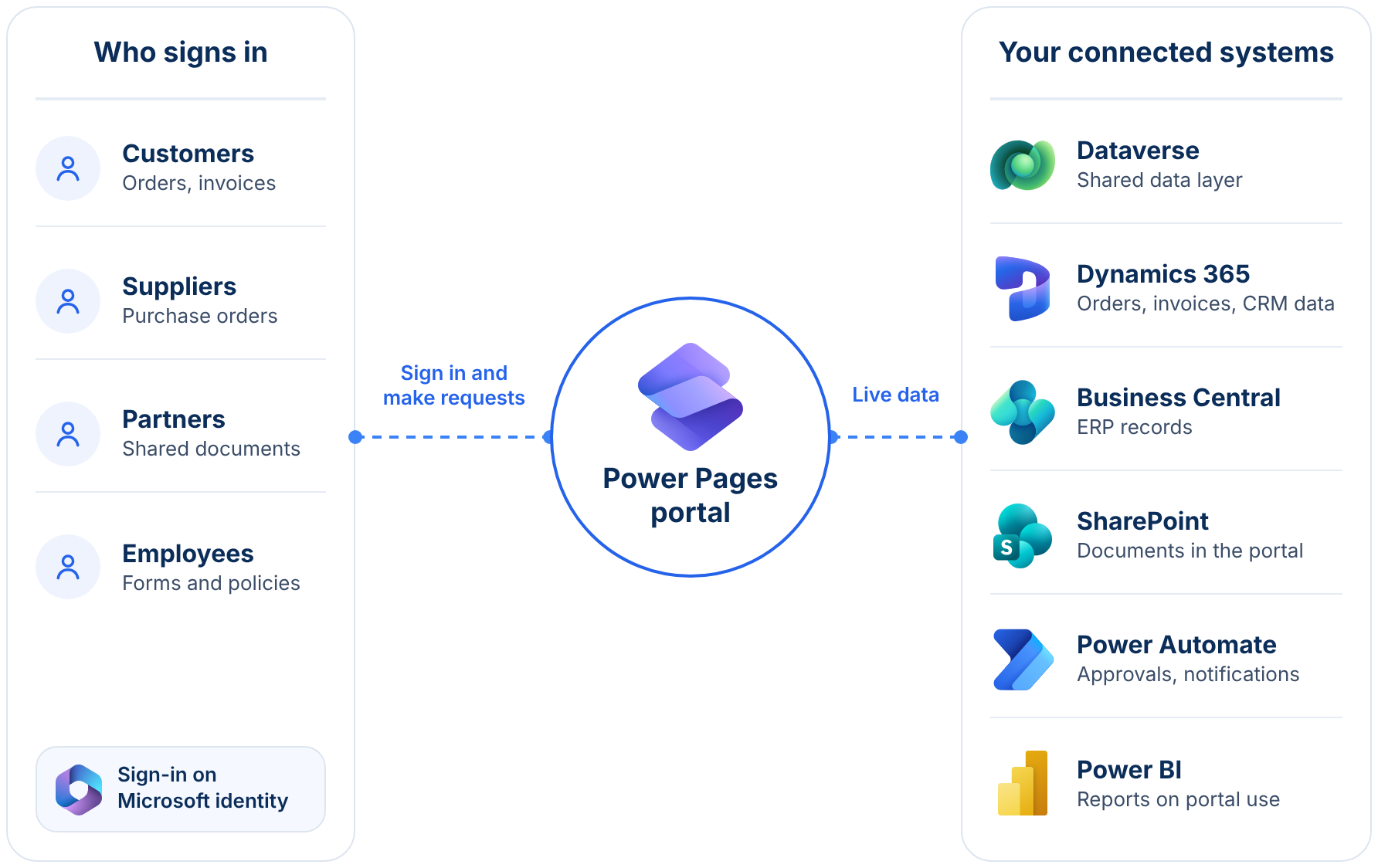
One Platform for Every Audience.
Each group sees only its own information.
ลูกค้า
View orders and invoices
Log and follow support requests
ซัพพลายเออร์
Manage purchase orders and deliveries
Submit and track invoices
พันธมิตร
Share projects and documents securely
Register and follow opportunities
พนักงาน
Access forms and internal services
Find resources and policies
บริการตนเอง in Action.
People view, request and update in real time.
ติดตามคำสั่งซื้อ
Check progress at any time.
ส่งคำขอ
Log enquiries and applications online.
ดาวน์โหลดเอกสาร
Download invoices and statements securely.
รายละเอียดการอัปเดต
Update account details without manual work.
บริการจอง
Book appointments and register online.
ค้นหาคำตอบ
Browse policies and FAQs at any time.
Connect Power Pages with Your Business Systems.
Power Pages works directly with your Microsoft applications.
Approvals and notifications triggered by portal requests
Reports and dashboards for portal activity
Portals on Business Central, Finance and Supply Chain Management, and CRM data
Dataverse as the shared data layer
Documents stored in SharePoint and shown in the portal
Sign-in and access control on Microsoft identity
Copilot helps build pages and forms
PRIME agents built by 9 Dots
Questions About Microsoft Power Pages.
What is Microsoft Power Pages?
Microsoft Power Pages is a low-code platform for building business websites and portals. Signed-in users can view information, submit requests and update records online. 9 Dots Consulting designs, builds and integrates your portal.
How is Power Pages different from a standard website?
A standard website mainly displays information. A Power Pages portal lets signed-in users work with live business data. Users can track orders, submit forms and download documents without contacting your team. 9 Dots Consulting builds the portal around the processes your team handles today.
Can Power Pages connect to Dynamics 365?
Yes. Power Pages uses Microsoft Dataverse, the data platform behind many Dynamics 365 applications. Portals show and update information from Dynamics 365, Business Central and other connected systems. 9 Dots Consulting connects the portal to the systems you already use.
Is a Power Pages portal secure?
Yes. Power Pages controls who can see and change each record. Users sign in with approved identity providers and permissions follow roles. 9 Dots Consulting designs the security around your organisation.
Can Copilot help us build a portal?
Yes. Copilot helps build pages and forms. 9 Dots Consulting reviews the result and connects the portal to your data.
Can we start with one audience?
Yes. You can start with one group, such as customers or suppliers, and add other groups later. 9 Dots Consulting helps you choose the first audience.
How is Power Pages licensed?
The answer depends on the number and type of users, such as signed-in users and anonymous visitors. 9 Dots Consulting reviews your audiences and expected usage and recommends the right plan. We supply licences in ASEAN, Hong Kong, Taiwan and South Korea.
Do you support Power Pages after go-live?
Yes. 9 Dots Consulting supports your portal after go-live through Application Management Services. We cover user support, updates, enhancements and monitoring.