9 Dots Consulting

MICROSOFT DYNAMICS 365

Dynamics 365 Business Central

Business Central brings finance, sales, purchasing, inventory, projects and manufacturing into one cloud ERP, with Copilot supporting everyday work. We implement and support it for growing organisations and subsidiary groups across Asia-Pacific.

Cloud ERP • Connected Operations • Microsoft 365 Copilot

Connect Finance and Operations in Business Central

We configure Business Central around the processes your teams use every day. Start with finance and add sales, inventory or projects as you grow. Keep the systems you want and connect them.

Financial Management

Accounting, cash management and reporting across entities and currencies.

Payables, receivables and bank reconciliation

Cash-flow forecasting and fixed assets

Budgets, currencies and consolidation

Sales, Purchasing and Inventory

Quotation to fulfilment, supplier purchasing and stock control in one flow.

Quotes, orders, invoices and returns

Purchasing, vendors and approvals

Inventory costing and replenishment

Projects and Resources

Project budgets, time, costs and billing in the same financial system.

Project budgets, tasks and milestones

Time, cost and expense tracking

Project invoicing and profitability

Manufacturing, Warehouse and Service

Production planning, warehouse activity and after-sales service (Premium).

Bills of materials, routings and orders

Warehouse receiving, picking and shipment

Service orders, contracts and repairs

Connect Business Central with Microsoft 365, Copilot and AI Agents

Business Central runs in Microsoft's cloud with automatic updates and remote access so you don't manage servers. Work with it in Outlook, Excel and Teams, report in Power BI and let AI agents handle routine tasks. Business Central stays the system of record.

Microsoft 365 and Power Platform

Outlook, Excel and Teams

Power BI reporting

Power Automate and Power Apps workflows

Dynamics 365 Sales and third-party integrations

Copilot and AI Agents

Copilot chat and natural-language analysis

Sales Order Agent and Payables Agent

Custom agents in Copilot Studio

PRIME agents built by 9 Dots

Business Central Essentials and Premium

Business Central comes in two licence types. Essentials covers finance, sales, purchasing, inventory and projects. Premium adds manufacturing and service management. Light users who only view, approve or enter time can use lower-cost Team Members licences.

Business Central Essentials

Core finance and operations in one system.

Finance and accounting

Sales, purchasing and inventory

Projects and resources

Business Central Premium

Everything in Essentials, plus:

Manufacturing and production planning

Capacity planning and manufacturing costs

Service management and repairs

Choose Your Business Central Implementation Route

Choose a tailored implementation for specialised requirements, or Jumpstart ERP for a defined, preconfigured scope.

Tailored Implementation

For detailed process design, multiple entities, specialised reporting, integrations or extensions.

Solution design and data migration

Localisation and integrations

Testing, training and post-go-live support

Jumpstart ERP

A fixed-scope route with a typical go-live of 8 to 12 weeks.

A Finance, Trade or Assembly package

Microsoft Copilot agents and a PRIME agent included

One Microsoft 365 Copilot Business licence for one nominated user in Year 1

Selected Business Central Customer Stories

See how growing and mid-sized organisations across Asia-Pacific use Business Central.

KOWA Asia Pacific logo

Singapore

Trading & Pharmaceuticals

KOWA Asia Pacific

A centrally managed platform for Singapore operations, with approval workflows and operational reporting.

Financial Operations · Approval Workflows · Document Control · Operational Reporting


Singapore

Technology & IT Services

Keppel Technology Solutions

Finance, inventory and field service on one platform, with automated scheduling and Power BI reporting.

Finance and Inventory · Field Service · Power BI Reporting


9 Dots Consulting Customer Malaysian Employers Federation (MEF) Malaysia Logo

Malaysia

Employers Association

Malaysian Employers Federation

Modernised financial and workforce operations with automated processes and real-time reporting.

Financial Management · Workforce Operations · Process Automation · Regulatory Reporting


Business Central Delivery Across Asia-Pacific

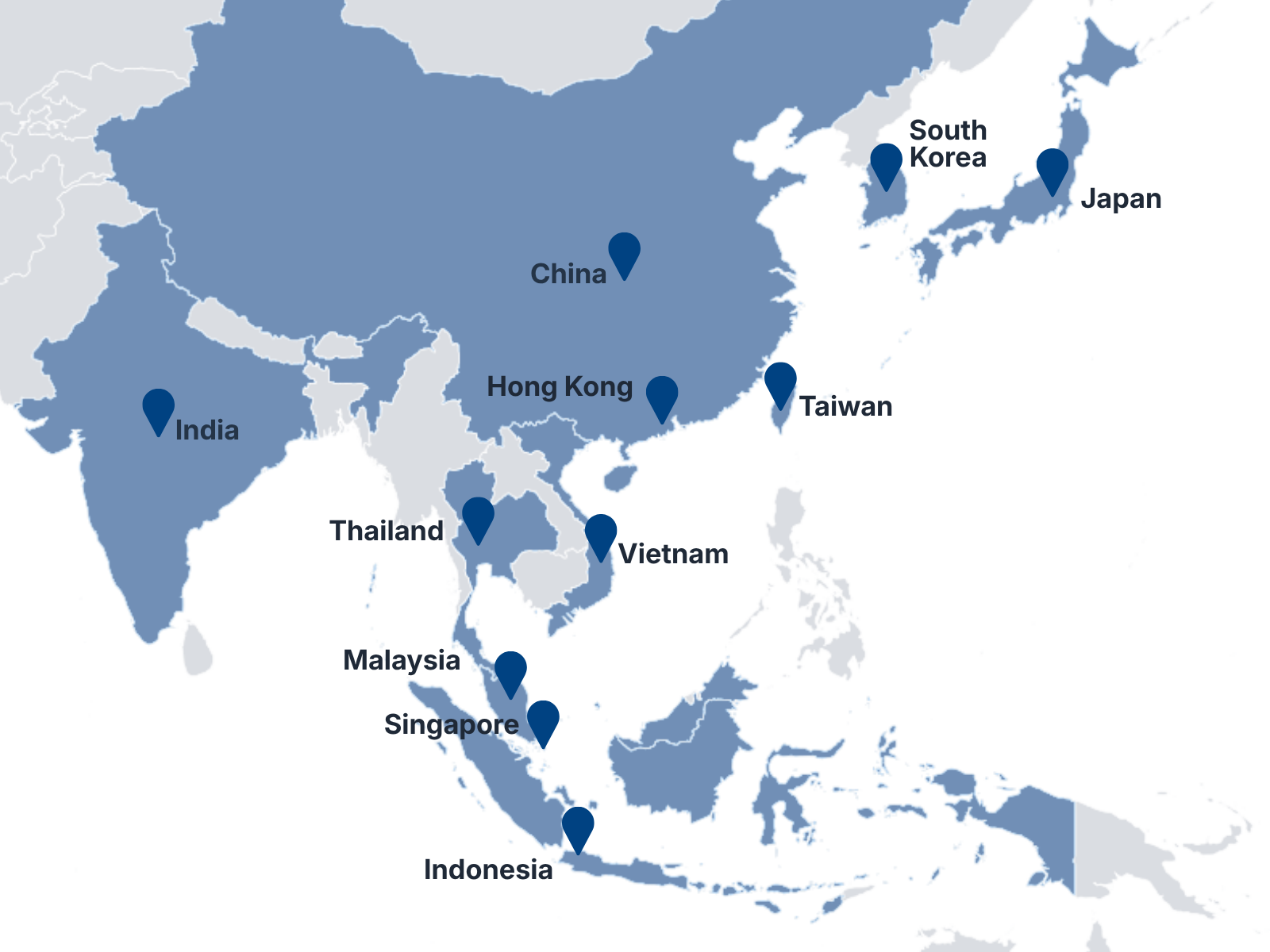
Solution design, migration, localisation, regional rollout and ongoing support for the complete Business Central lifecycle, from 11 locations.

Map showing 9 Dots Consulting locations across 11 Asia-Pacific markets
Microsoft Logo

Microsoft Partner Recognition

Managed Partner · Tier-1 Cloud Solution Provider · ECIF Green Partner

11

APAC Locations

250+

Team Members

15+

Years of Experience

300+

Projects Delivered

Frequently Asked Questions

Is Business Central the same as Dynamics 365?

No. Dynamics 365 is a family of business applications. Business Central is one of them, designed for small and mid-sized organisations. Finance and Supply Chain Management suits larger, multi-entity operations.

What is the difference between Business Central Essentials and Premium?

Essentials covers finance, sales, purchasing, inventory, projects and assembly management. Premium adds production and service management.

Should we choose a tailored implementation or Jumpstart ERP?

Choose a tailored implementation for detailed process design, multiple entities, specialised reporting, integrations or extensions. Choose Jumpstart ERP if you can adopt a defined, preconfigured scope in a Finance, Trade or Assembly package.

How long does a Business Central implementation take?

A tailored implementation depends on scope, integrations, data migration and the number of entities. Jumpstart ERP is a fixed-scope route with a typical go-live of 8 to 12 weeks.

Which AI agents work in Business Central?

Microsoft's Business Central agents include the Sales Order Agent and the Payables Agent. They use Copilot Credits and consumption-based billing, so confirm availability and charges before deployment. You can also build agents in Copilot Studio and add PRIME agents built by 9 Dots.

Plan Your Business Central Implementation

Fill in the form or email us about your current systems, processes and expected scope. We respond within one business day and will help you identify the next step, even if your requirements are still being defined.