9 Dots Consulting

Microsoft 365 copilot

Adopt Microsoft 365 Copilot Across Your Organisation

From licensing and readiness to deployment, training and ongoing support, we help organisations across Asia-Pacific make Microsoft 365 Copilot part of everyday work.

AI Built Around Your Work

Microsoft 365 Copilot combines generative AI with the applications, information and context available through Microsoft 365. It helps users find information, create content, analyse data and move work forward without continually switching between tools.

Chat and Cowork

Ask questions, develop content and hand off complex work grounded in organisational context

Search

Find relevant information across Microsoft 365 using natural-language questions

Agents

Use ready-made or configured agents for particular tasks, roles and workflows

Notebooks

Bring files, conversations and meeting notes together for focused analysis Create

Create

Turn ideas and existing material into designed content, video, audio and surveys

Microsoft 365 Apps

Work with Copilot across Word, Excel, PowerPoint, Outlook and Teams

Capabilities vary according to licensing, configuration, market availability and Microsoft product updates

Work More Effectively in Familiar Applications

Microsoft 365 Copilot brings AI into the applications people already use, reducing the time spent finding information, preparing first drafts and catching up on everyday work.

Microsoft 365 Copilot connected with Word, Excel, Teams, Outlook and PowerPoint

Word

Draft, revise and summarise documents using prompts and existing content

Excel

Explore data, identify patterns and develop formulas and visualisations

Teams

Review meetings, capture decisions and organise follow-up tasks

Outlook

Draft emails, summarise conversations and identify important actions

PowerPoint

Create and refine presentations using prompts, documents and existing material

Connect AI With Organisational Context

Microsoft 365 Copilot is powered by Work IQ, Microsoft’s workplace intelligence layer. It connects organisational information, user context and Microsoft 365 tools to provide responses relevant to each person’s role and current work.

This may include authorised documents, emails, meetings, conversations and other Microsoft 365 content.

The quality of the experience therefore depends on well-managed information, appropriate permissions and clear governance.

Information

The work content each individual is authorised to access

Context

The user’s role, working relationships and current activities

Tools

Microsoft 365 applications, Copilot experiences and approved agents

Support Teams Across the Organisation

Copilot use cases should reflect the work performed by each team. Starting with familiar, repeatable tasks makes it easier for users to understand where Copilot can help and where professional judgement remains essential.

Executives

Prepare briefings, summarise business information and develop presentations

Finance

Explore financial information and identify patterns within spreadsheets and reports

Sales and Customer Service

Prepare communications and summarise customer conversations and follow-up actions

Human Resources

Draft policies, job descriptions, onboarding material and internal communications

Operations

Summarise meetings, organise information and coordinate activities across teams

Marketing

Develop first drafts, campaign ideas, presentations and content summaries

Licences Alone Do Not Create Adoption

Microsoft 365 Copilot can be enabled quickly, but meaningful adoption depends on what happens before and after licences are assigned. Organisations need appropriate permissions, relevant use cases, informed users and a way to evaluate whether Copilot is improving work.

Data and Access

Review what users can find and whether sensitive information is appropriately protected

Relevant Use Cases

Identify tasks where Copilot can provide practical and repeatable value

User Confidence

Give employees role-based guidance rather than relying on generic demonstrations

Measurement

Monitor adoption, usage and outcomes before extending deployment

One Partner From Licensing to Long-Term Adoption

We bring Microsoft licensing, technical readiness, business applications and regional delivery together through one team. We help customers establish a practical starting point, support the initial deployment and continue improving adoption after launch.

ASSESS Review licensing, applications, data access, security and organisational readiness

PRIORITISE Identify valuable use cases for particular teams, roles and working practices

PREPARE Address permissions, governance, technical prerequisites and deployment planning

PILOT Introduce Copilot to selected users with role-based training and practical support

EXPAND Review adoption, refine working practices and extend deployment across the organisation

Microsoft Capability With Asia-Pacific Delivery

Our Microsoft relationship, licensing capability and regional delivery teams allow us to support Microsoft 365 Copilot as part of the customer’s wider technology environment rather than as an isolated application.

Licensing and Deployment

As a Tier-1 Microsoft Cloud Solution Provider, we help customers select, procure and manage licences, deployment and ongoing support.

Connected Microsoft Systems

Our experience across Microsoft 365, Dynamics 365, Azure and Power Platform helps us connect Copilot with the wider technology environment.

Regional and Local Teams

Our Asia-Pacific teams combine regional capability with local knowledge of language, regulation and business practices in each market.

Continuing Support

We support Copilot beyond the initial rollout through user enablement, licensing, adoption reviews and Application Management Services.

Prepare a Secure Foundation for Copilot

Microsoft 365 Copilot operates within Microsoft’s enterprise security, privacy and compliance framework. It respects existing identities, permissions, sensitivity labels and retention policies, so users only receive organisational information they are authorised to access.

Data Privacy Microsoft states that organisational prompts, inputs and responses are not used to train its foundation models

Permission-Aware Access Copilot works within the access controls already applied across Microsoft 365

Administrative Oversight IT teams can manage availability, policies, agents and usage across the organisation

Copilot respects existing permissions, but it does not correct excessive or poorly managed access. We help customers review their environment before deployment so potential information exposure can be addressed early.

Choose the Right Copilot Licensing Approach

Microsoft offers different Copilot plans and purchasing options depending on an organisation’s existing subscriptions and required capabilities. As a Tier-1 Microsoft Cloud Solution Provider, 9 Dots Consulting can help confirm prerequisites, compare available options, procure licences and support ongoing licence management.

Extend AI Into Business Operations

Microsoft 365 Copilot supports people as they find information, create content and complete everyday work. PRIME AI Solutions applies configurable business agents to defined operational processes across ERP and connected systems.

For organisations using both approaches, we can help connect workplace productivity with operational automation through a coordinated AI programme.

PRIME AI Logo

Start Your Microsoft 365 Copilot Adoption

Whether you are assessing Microsoft 365 Copilot for the first time or preparing to expand an existing deployment, our teams can help you establish a secure foundation, choose appropriate licences, support users and improve adoption across Asia-Pacific.

Eligible engagements may qualify for Microsoft funding, subject to Microsoft’s criteria and approval.

Microsoft

Managed Partner • Tier-1 Cloud Solution Provider • ECIF Green Partner

11

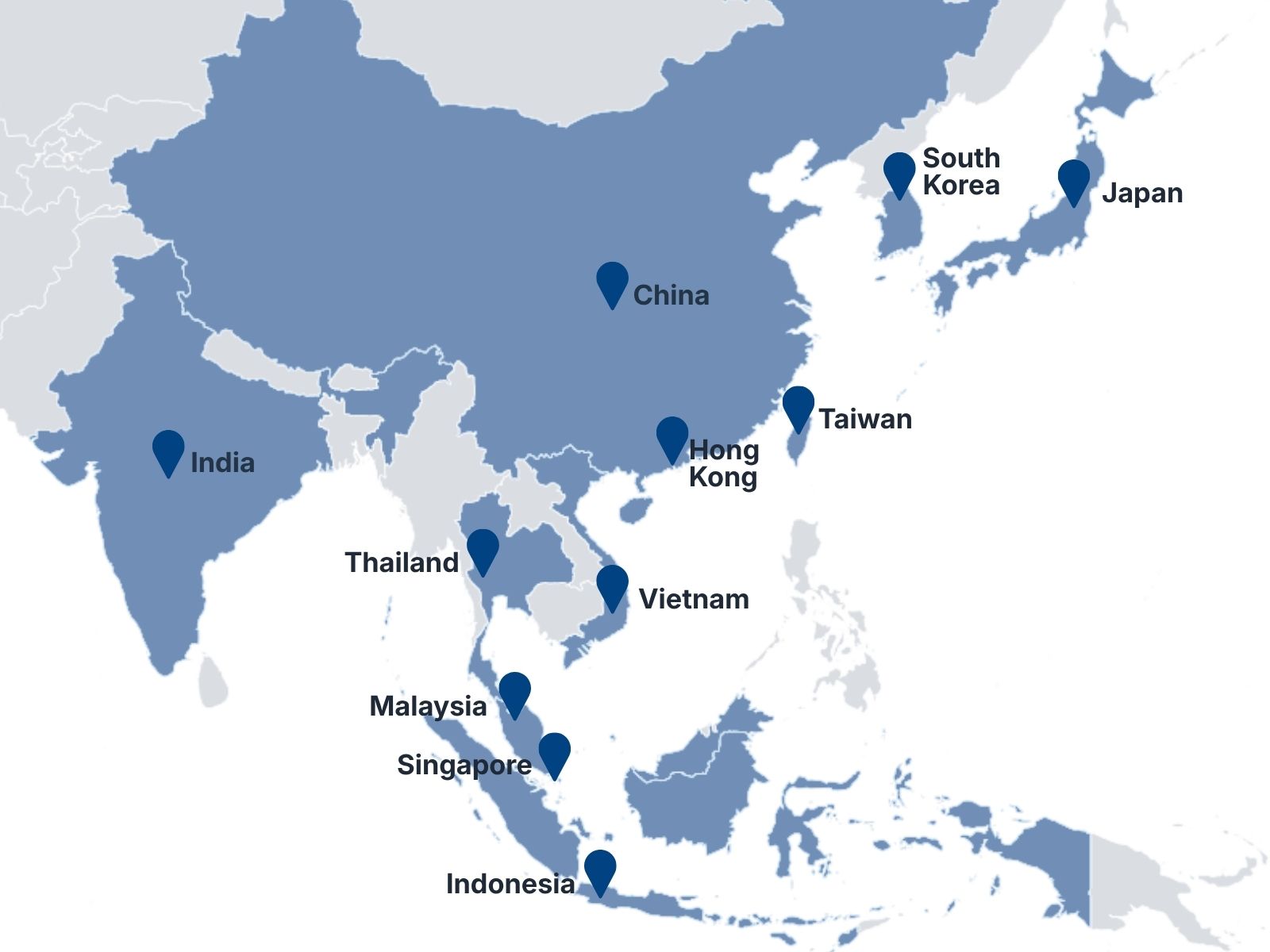
Asia-Pacific Locations

20+

Countries Served

250+

Team Members

300+

Projects Delivered

    EN